
Windows 8 includes a new feature called File History, which is an advanced backup program. It can periodically create a backup of files from your libraries (which you can customize to any folder or files) to an external drive or network location. This is an extremely valuable feature, as I have been called many times asking if I can get a file back that they overwrote or lost due to a hard drive failure. There are times when I can get the file back, other times they are out of luck. With this feature, your files can be safe in case of a hard drive or machine failure, or in case you accidently delete a file and empty the recycle bin.
The File History program is located in the Control Panel, and is very easy to use.
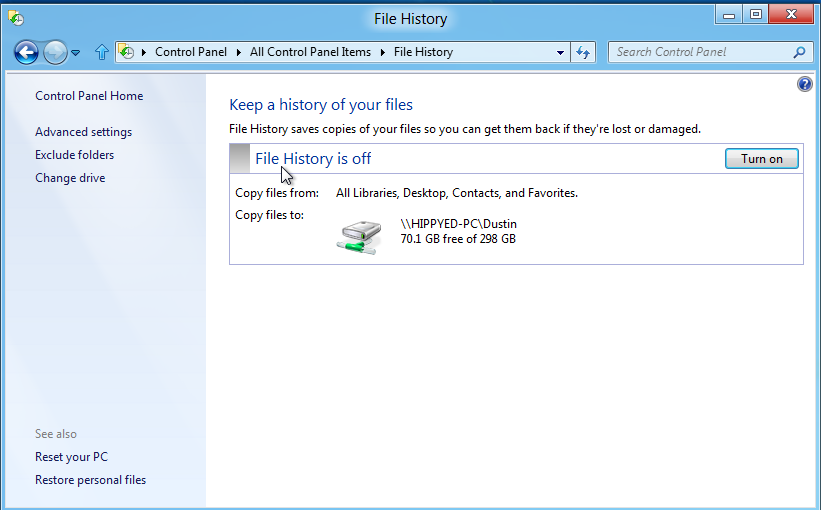
You can select when files are backed up and what files or folders to be backed up, as well as where you want them to be backed up. It only takes a minute to set up and is an extremely valuable feature.
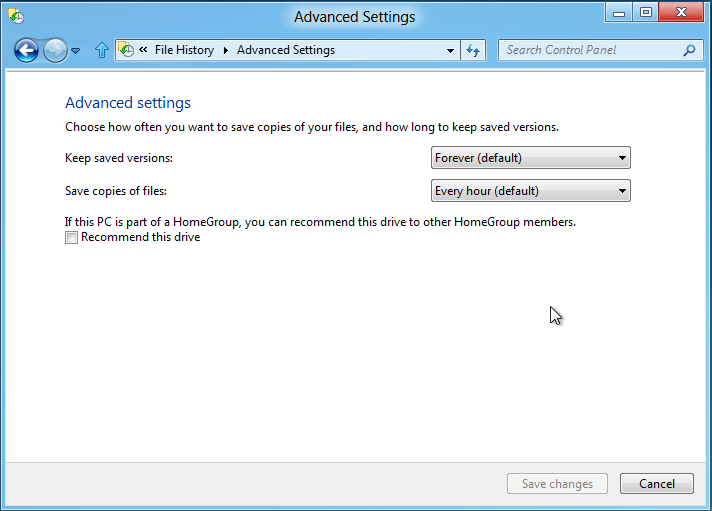
This is a great feature for home use, and I am hoping that Windows Server 8 will include a backup feature similar that does everything through Group Policy. Having it on the client side is excellent for a home environment or a small office, but managing it on a larger scale is impractical.
I am currently using a network drive for a backup. I am wondering if you could use multiple drives for redundant backups, or in case of one (network drive) being unavailable.
MSTechPages is a participant in the Amazon Services LLC Associates Program, an affiliate advertising program designed to provide a means for sites to earn advertising fees by advertising and linking to Amazon.com. As an Amazon Associate, we earn from qualifying purchases at no extra cost to you.
