Microsoft has updated several things in the Microsoft Store which can come in very handy if you’re a developer. However, the one thing that really stands out to me as being very awesome and a great addition is the Microsoft Store Command Line Interface. While the GUI is very functional, there are times when you want that nostalgia of the CLI. I don’t know if I’m in the minority here, but this is just a really cool addition. Should they have worked on overall Store functionality, stability, and getting it cleaned up? Absolutely. Sometimes you just need to have some fun and create a really cool command line interface to access the Microsoft Store. I love this!
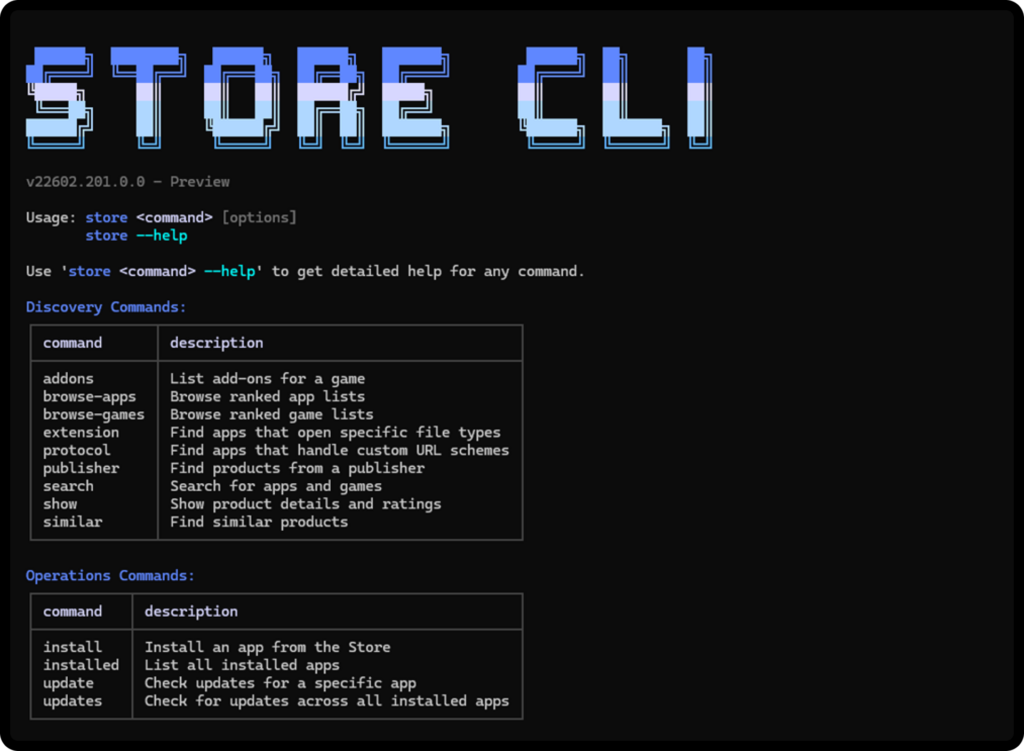
A new command-line interface for the Microsoft Store brings app discovery, installation and update management directly to your terminal. This enables developers and users with a new way to discover and install Store apps, without needing the GUI. The Store CLI is available only on devices where Microsoft Store is enabled.
Key capabilities include:
-
Browse apps with
store browse-apps: Search and filter the Store catalog by category, subcategory, listing type (top-free, top-paid, new releases), market, language and more.
-
Install apps instantly with
store install <product-id>: Deploy apps directly from the command line with a single command.
-
Update specific apps with
store update <product-id>: Install the latest version of any app without navigating through menus.
MSTechPages is a participant in the Amazon Services LLC Associates Program, an affiliate advertising program designed to provide a means for sites to earn advertising fees by advertising and linking to Amazon.com. As an Amazon Associate, we earn from qualifying purchases at no extra cost to you.