Estimated Reading Time: 2 min
If you’re running on a metered internet connection, like many are, Windows Update on Windows 10 will bypass any settings you may have set to limit downloads. With the new updates, Microsoft has changed their Windows Update dialog to state “We’ll automatically download and install updates, except on metered connections (where charges may apply). In that case, we’ll automatically download only those updates required to keep Windows running smoothly.” (emphasis mine). At this point, I don’t know what the size and frequency of the updates that are “required to keep Windows running smoothly”. It could be minimal or it could be a substantial download. Either way, it could be over the top for some users.
I know of several people that are very limited to their bandwidth and are capped at a certain amount or pay for what they use. Some have left Windows 10 because of the high amounts of data it does consume, even when set to not download over a metered connection.
Hopefully, there is a reversal on Microsoft’s part for this policy as I can anticipate a lot of backlash in forums when this takes effect and the bill shows up.
This image is from the most recent build of Windows 10 in the fast ring of the Windows Insider program, build 15058 from my Surface Pro 4:
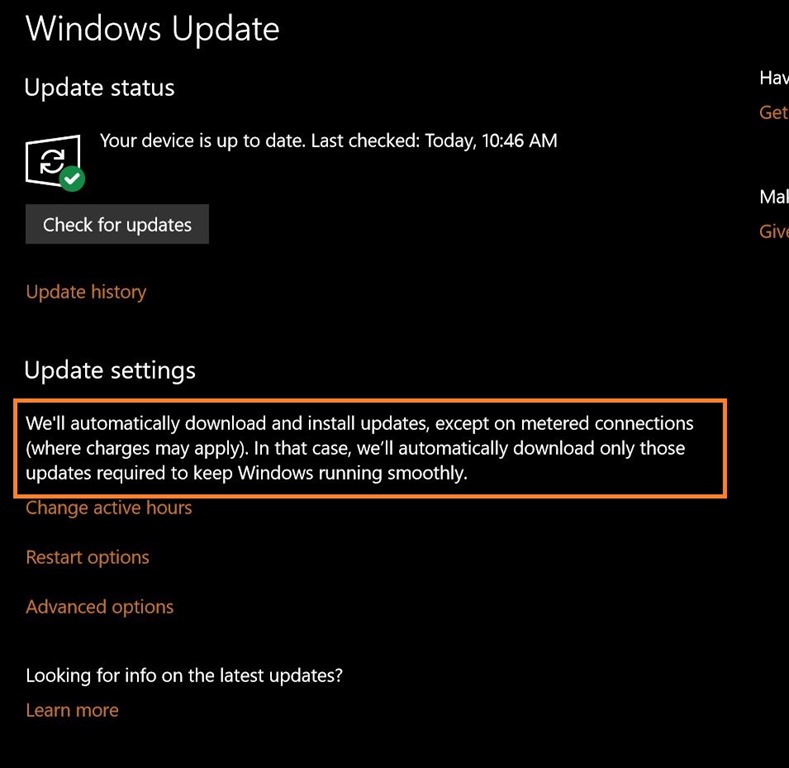
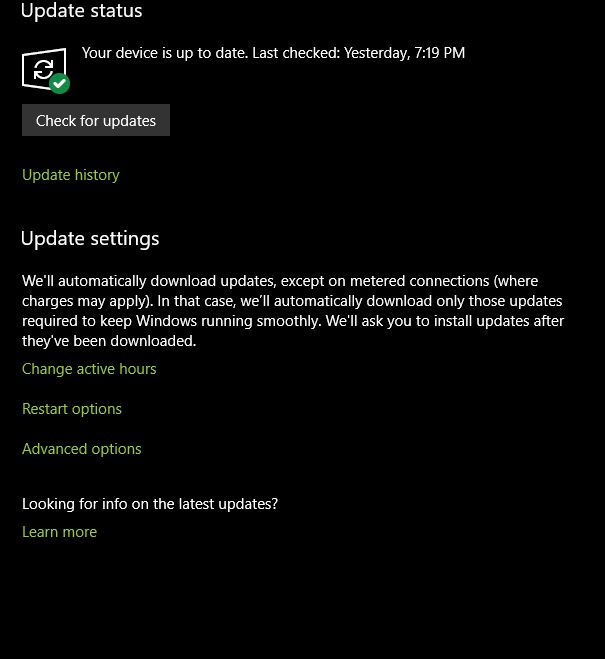
UPDATE: This may or may not be included within the final Creators Update. I notice that on another machine (my desktop), the message is slightly different. They may be testing out different things with these latest builds. It has happened in the past with testing various things that ended up not being included in the final builds. I will reach out to Microsoft and see if I can get an “official” word on this.
This report was also found by Richard Hay over at WinSuperSite – http://winsupersite.com/windows-10/metered-connections-windows-10-creators-update-will-not-block-all-windows-update-download
MSTechPages is a participant in the Amazon Services LLC Associates Program, an affiliate advertising program designed to provide a means for sites to earn advertising fees by advertising and linking to Amazon.com. As an Amazon Associate, we earn from qualifying purchases at no extra cost to you.