MSTechpages
  • Home
  • Knowledge Base
  • Reviews
  • Articles
  • About
News

IE9 Tops Tests in HTML5

Nov 1, 2010·Dustin

Estimated Reading Time: 1 min

The browser wars continue, with all major browsers pushing for full compatibility with HTML5, which is amazing. Surprisingly, Internet Explorer 9 is in the top spot as far as compatibility goes. Remember, though, that HTML5 still isn’t an approved standard and is still in development. But, from initial tests HTML5 can do some amazing things!

Yes, the HTML5 spec has yet to finalized. And yes, these tests cover only a portion of the spec. But we can still marvel at just how much Microsoft’s browser philosophy has changed in recent months.

The W3C tests — available here — put IE9 beta release 6 at the top of the HTML5 conformance table, followed by Google Chrome 7, the Firefox 4 beta 6, Opera 10.6, and Safari 5.0. The tests cover seven aspects of the spec: “attributes”, “audio”, “video”, “canvas”, “getElementsByClassName”, “foreigncontent,” and “xhtml5”:
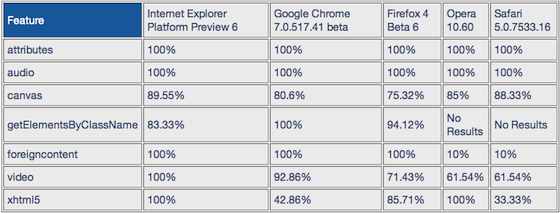
W3C HTML5 tests
Related Products on Amazon
USB Flash DriveShop on Amazon
External SSDShop on Amazon
Wireless KeyboardShop on Amazon
PC Cleaning KitShop on Amazon

MSTechPages is a participant in the Amazon Services LLC Associates Program, an affiliate advertising program designed to provide a means for sites to earn advertising fees by advertising and linking to Amazon.com. As an Amazon Associate, we earn from qualifying purchases at no extra cost to you.


#HTML5 #Internet Explorer 9
Dustin

Dustin is the founder and head editor of MSTechpages. He started the site to help other users of Windows. He has been very active with helping others throughout the years, from USENET to Microsoft Answers to the latest Microsoft Communities as well as other internet forums such as Reddit. He is a Sr. System Administrator, holds several industry certifications and degrees.

Related Articles

News

Microsoft Scoots Away From Silverlight

Nov 1, 2010 · Dustin
Windows 7

How To Add More Rows in Tabs – Internet Explorer 9

Oct 19, 2010 · Dustin
Xeno asks how Windows XP randomly chooses a profile picture when an account is first created News

Windows XP Logon Picture

Sep 10, 2026 · Dustin

Windows Insider Builds

Beta
26220.9587
Beta (26H1)
28020.3142
Experimental
26340.9596
Experimental (26H1)
28120.3151
Experimental (Future)
29680.1000
Recent Knowledge Base Articles
  • Disable Touch Screen in Windows
  • Add “End Task” To Right Click Application on Taskbar
  • Offline install of .Net Framework 3.5 using DISM
  • Disable Autohide Scrollbars
  • Install Active Directory RSAT in Windows 10 1809 or later
  • Disable File Grouping in File Explorer
  • Forget Wireless Networks
  • Show Hidden Files & Folders
  • Enable Night Light Mode
  • How to Fix a Network Printer Showing Offline
MSTechpages

Your source for Windows news, tutorials, and Insider builds.

Windows

  • Windows 11
  • Windows Insider
  • Canary Channel
  • Cumulative Updates

Resources

  • Knowledge Base
  • Articles
  • Reviews

Company

  • About
  • Contact
  • Privacy Policy
  • Advertise

© 2026 MSTechpages. All rights reserved.

Privacy