MSTechpages
  • Home
  • Knowledge Base
  • Reviews
  • Articles
  • About
News

Internet Explorer “Protected Mode” Can Be Bypassed

Dec 5, 2010·Dustin

The Protected Mode in the later versions of Internet Explorer has been proven to be not so “Protected” as previously thought. While it is a security hole, it can also be avoided as much as possible by limiting the trusted Intranet Zone.

Researchers from Verizon Business have now described a way of bypassing Protected Mode in IE 7 and 8 in order to gain access to user accounts. The technique requires a vulnerability that allows the execution of malicious code in the browser or in a browser extension. Although the malware will initially only run in the browser’s Low Integrity Mode, it can start a web server on the computer that will respond to requests on any port of the loopback interface. By calling the IELaunchURL() function, an attacker can instruct IE to load a URL from this web server, for instance “http://localhost/exploit.html”. Localhost is generally part of IE’s Local Intranet Zone and, by default, Protected Mode is disabled for content from this zone.

Related Products on Amazon
USB Flash DriveShop on Amazon
External SSDShop on Amazon
Wireless KeyboardShop on Amazon
PC Cleaning KitShop on Amazon

MSTechPages is a participant in the Amazon Services LLC Associates Program, an affiliate advertising program designed to provide a means for sites to earn advertising fees by advertising and linking to Amazon.com. As an Amazon Associate, we earn from qualifying purchases at no extra cost to you.

#IE7 #IE8 #Security
Dustin

Related Articles

News

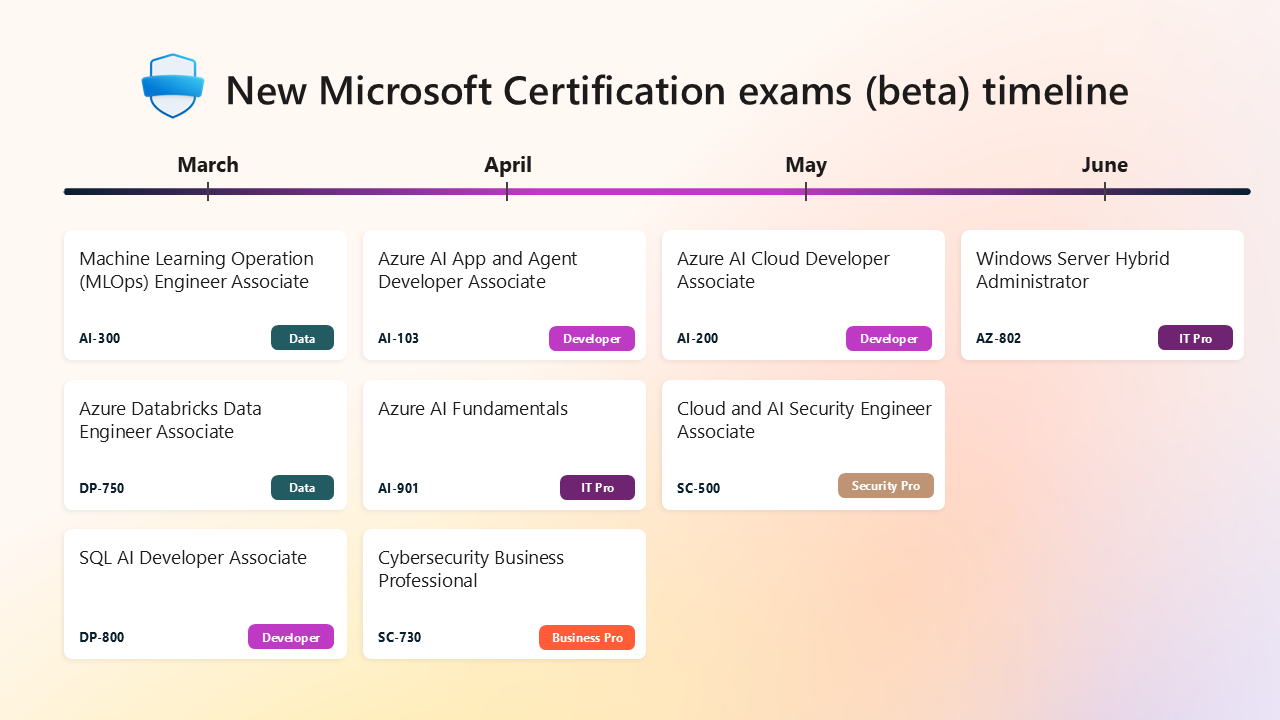
Microsoft Releasing New Certifications for AI, Azure, Security

Mar 9, 2026·Dustin
News

Microsoft Bringing Back the Vertical Taskbar… Drama Ensues.

Feb 15, 2026·Dustin
News

Microsoft Store Adds CLI Interface

Feb 12, 2026·Dustin

Windows Insider Builds

Canary
28020.1685
Dev
26300.7965
Beta
26220.7961
Release Preview
26100.7918
Recent Knowledge Base Articles
  • Add “End Task” To Right Click Application on Taskbar
  • Offline install of .Net Framework 3.5 using DISM
  • Disable Autohide Scrollbars
  • Install Active Directory RSAT in Windows 10 1809 or later
  • Disable File Grouping in File Explorer
  • Forget Wireless Networks
  • Show Hidden Files & Folders
  • Enable Night Light Mode
  • How to Fix a Network Printer Showing Offline
  • Open a Command Prompt/Powershell Prompt at Folder Location
MSTechpages

Your source for Windows news, tutorials, and Insider builds.

Windows

  • Windows 11
  • Windows Insider
  • Canary Channel
  • Cumulative Updates

Resources

  • Knowledge Base
  • Articles
  • Reviews

Company

  • About
  • Contact
  • Privacy Policy
  • Advertise

© 2026 MSTechpages. All rights reserved.

Privacy