Estimated Reading Time: 1 min
With the release of Vista came the demise of the built in Telnet command. You can add it again using the Programs and Features tool in the Control Panel, but here is how you can do it with a single command.
1. Open a Command Prompt with administrative permissions. Start > All Programs > Accessories > right click Command Prompt and select Run as Administrator.
2. Type (or cut and paste) dism /online /Enable-Feature /FeatureName:TelnetClient and press enter.
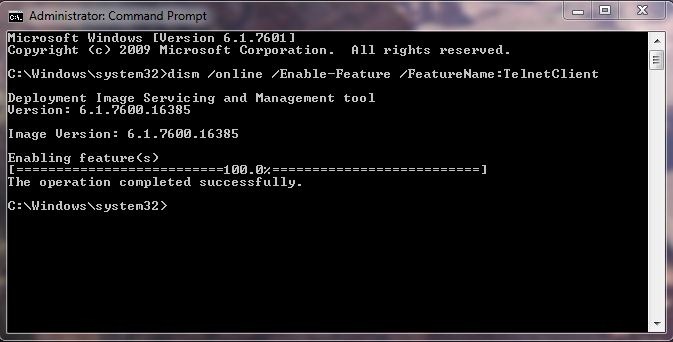
3. Telnet is now available in Windows.
Credit for this tip goes to Steve Sinchak from Tweaks.com.
MSTechPages is a participant in the Amazon Services LLC Associates Program, an affiliate advertising program designed to provide a means for sites to earn advertising fees by advertising and linking to Amazon.com. As an Amazon Associate, we earn from qualifying purchases at no extra cost to you.