Estimated Reading Time: 2 min
We recently had a migration to Office 2013 at work. We had an issue on several PC’s where we would have missing graphics on the application – from missing icons, to missing arrows on pull down menus, even the Maximize/Minimize/Close buttons were gone. You can see in this example – the down arrows for the fonts are missing, the File icon (it’s white, but not visible in this shot), and close/minimize/maximize buttons are missing.

After a lot of searching and testing and uninstalling and reinstalling Office, other applications and installing various .Net libraries, we have a solution. It may not be a fix for every situation, but it seems to fix all of our issues on all our machines. The culprit – KB2670838. When we uninstalled the KB, as well as Internet Explorer 10, the issue was resolved. This seems to a common issue with some folks with Windows 7 (and can cause other issues – ‘gfxui.exe has stopped working’, Aero not working, Desktop Windows Manager service crashing but shows running, etc.).
***Before you attempt to uninstall the KB (it automatically uninstalls Internet Explorer 10, as well) – make sure you download another browser (either install files for IE9 or install Chrome/Firefox/Opera). If you do not have another browser ready to go or ready to install, you won’t be able to download one. There won’t be one installed to do so.***
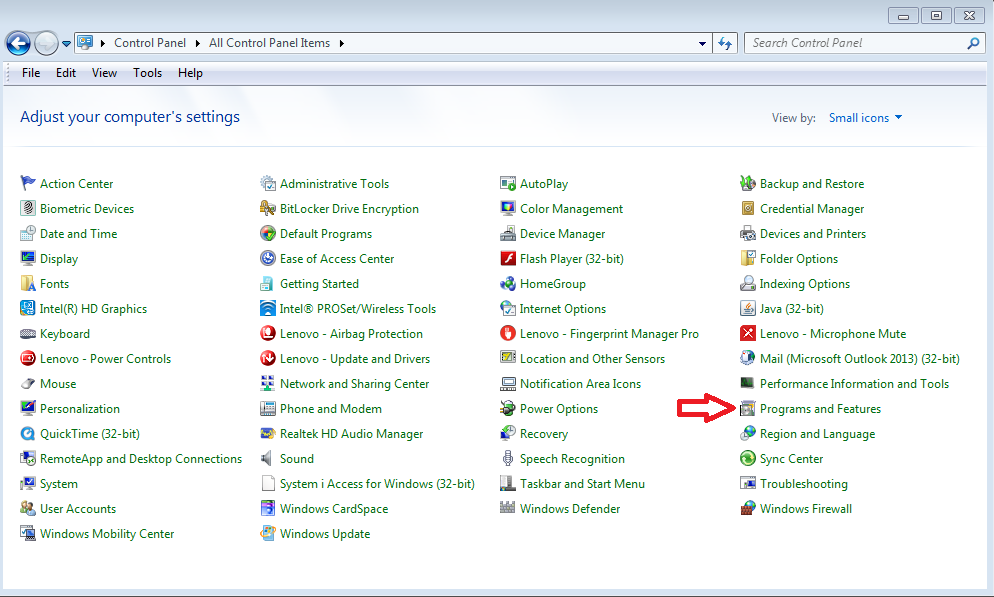
Here is how to uninstall the KB – 1. Open the Control Panel, click Programs and Features.
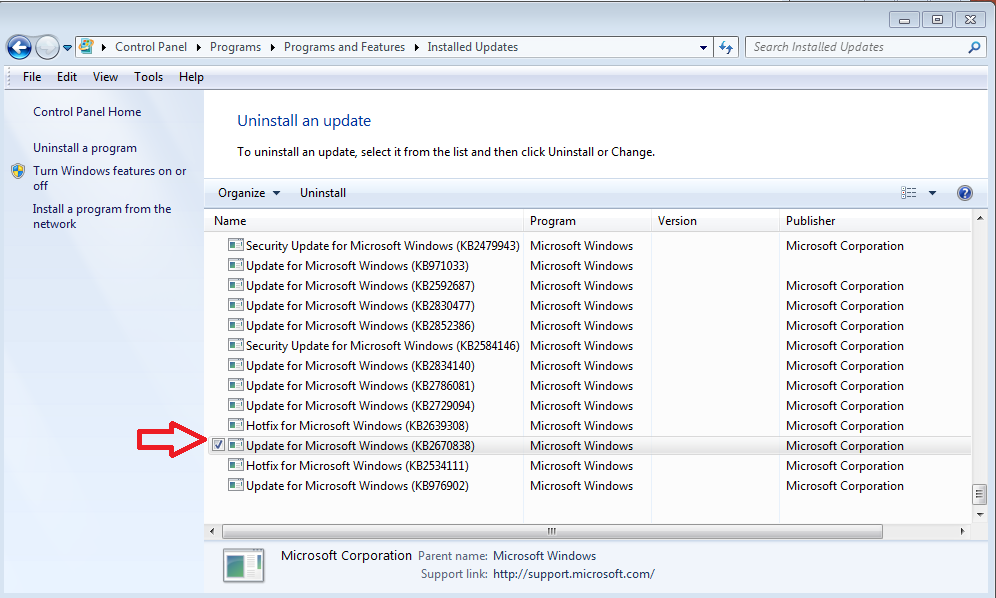
2. In the left pane, select “View installed updates”. Find the KB2670838 entry, click it and select “Uninstall” at the top of the window.
3. Reboot the machine, and when you reopen an Office 2013 application, the missing graphics should have returned.

Now, to get Internet Explorer back (or use an alternative browser), use the install file for your browser of choice. If you are resolving this issue, it’s best to go with Internet Explorer 9 or an alternative browser. Updating to IE10 may bring the same issues.
MSTechPages is a participant in the Amazon Services LLC Associates Program, an affiliate advertising program designed to provide a means for sites to earn advertising fees by advertising and linking to Amazon.com. As an Amazon Associate, we earn from qualifying purchases at no extra cost to you.