
Estimated Reading Time: 2 min
A couple bits of information today regarding Microsoft’s moves into home automation, another hobby of mine. A while back, Microsoft announced they would be working with Amazon and Alexa integration with Cortana. While they had mentioned it would be working by the end of the year, 2017, that didn’t happen. Brad Sams asked why and got the typical “Soon.” response, which is much better than the other typical response – “We cannot comment on unreleased products or features.”.
I pinged both Amazon and Microsoft about the setback and the responses don’t offer any insight into the delay other than the feature will be rolled out in the near future. A Microsoft spokesperson tells me “We’ll have more to share soon.” and Amazon provided a similar response, “We’re working on it and expect to begin rolling it out soon”.
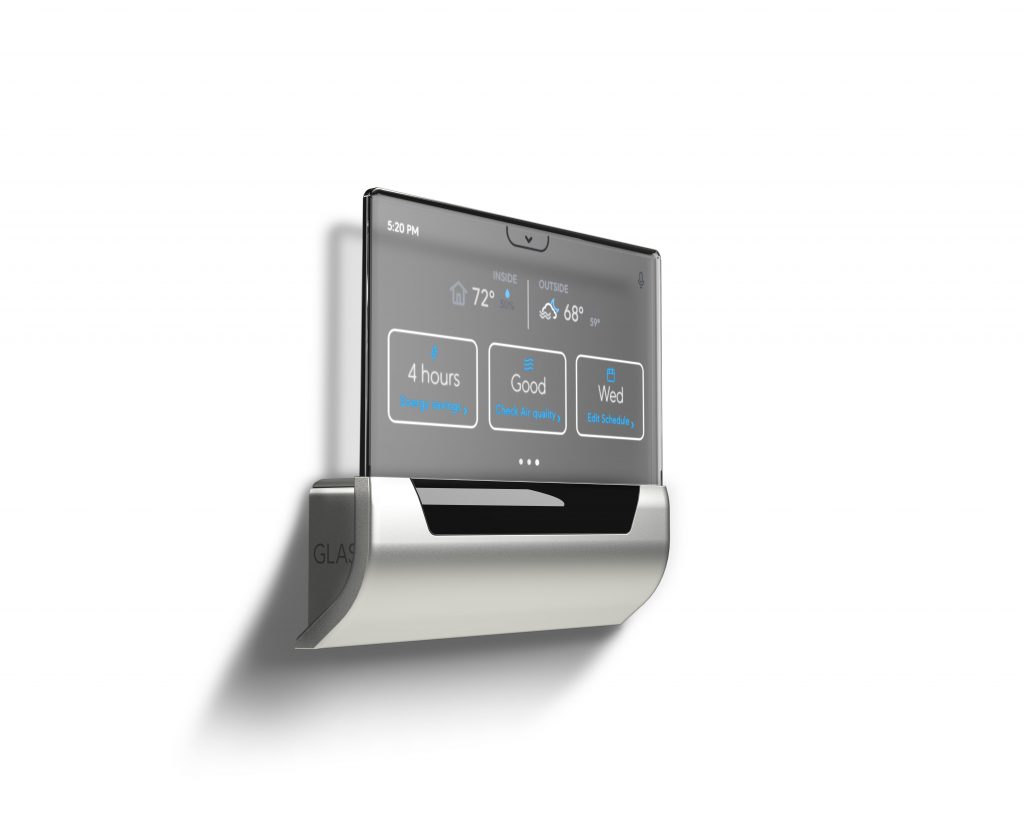
Now, Microsoft hasn’t put all it’s home automation ideas into one basket. They have partnered with Johnson Controls to release a smart thermostat, similar to Nest or Ecobee. This one, called GLAS, is powered by Windows IoT Core and has Cortana integration. With it’s nice looking display and options that give you plenty of information at your finger tips, it’s a nice addition to the smart thermostat category. It is set to release in March of this year, pricing is not yet available on the pre-order website.
Cortana is integrated into the thermostat so you can use your voice to easily adjust your space, in addition to understanding indoor and outdoor temperature and learning about the current weather forecast. For example, just say, “Hey Cortana, set the temperature to 68 degrees,” and GLAS will adjust the temperature in your space accordingly. Moreover, Cortana can help you manage your calendar, inform you of traffic, answer questions, and more, so all of this information is on display in one place to help jumpstart your day before leaving the door.
MSTechPages is a participant in the Amazon Services LLC Associates Program, an affiliate advertising program designed to provide a means for sites to earn advertising fees by advertising and linking to Amazon.com. As an Amazon Associate, we earn from qualifying purchases at no extra cost to you.



