
MSTechpages
  • Home
  • Knowledge Base
  • Reviews
  • Articles
  • About
News

10 Things You Must Do With Your New Windows 7 PC

Dec 26, 2009·Dustin·Comments (0)

Estimated Reading Time: 1 min

I know that a lot of people have joined in and either upgraded to Windows 7 or bought a new PC with Windows 7. Well, Gizmodo has a few things that you should do to get started and customize your new install.

1. Take a Spin Around the New Interface: Still glassy, glossy and damn near glittery, the Windows 7 interface is actually a major progression for Microsoft: It’s not just easy to use, it’s a whole new paradigm with the revamped taskbar and Aero Peek making multitasking with multiple windows more natural than ever.

Related Products on Amazon
USB Flash DriveShop on Amazon
External SSDShop on Amazon
Wireless KeyboardShop on Amazon
PC Cleaning KitShop on Amazon

MSTechPages is a participant in the Amazon Services LLC Associates Program, an affiliate advertising program designed to provide a means for sites to earn advertising fees by advertising and linking to Amazon.com. As an Amazon Associate, we earn from qualifying purchases at no extra cost to you.
Written by
Dustin · Founder and Head Editor, News Poster
Sr. Cybersecurity Engineer - Microsoft MVP Windows Experience (2014-2015)

Dustin is the founder and head editor of MSTechpages. He started the site to help other users of Windows. He has been very active with helping others throughout the years, from USENET to Microsoft Answers to the latest Microsoft Communities as well as other internet forums such as Reddit. He is a Sr. System Administrator, holds several industry certifications and degrees.

View all 1500 articles by Dustin →

Related Articles

SecurityUpdates News

Patch Tuesday a BIG One!

Oct 14, 2026 · Dustin
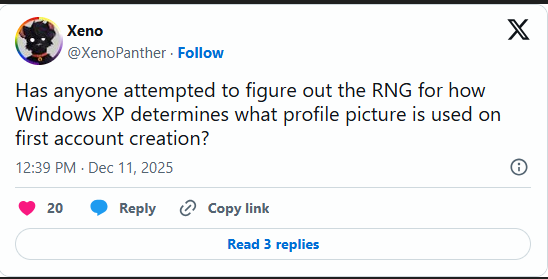
Xeno asks how Windows XP randomly chooses a profile picture when an account is first created News

Windows XP Logon Picture

Sep 10, 2026 · Dustin
New build for you! News

Windows 11 26H2 In Release Preview Channel

Aug 28, 2026 · Dustin

Windows Insider Builds

Beta
26320.9876
Beta (26H1)
28020.3445
Experimental
26340.9882
Experimental (26H1)
28120.3454
Experimental (Future)
29704.1000
Release Preview (25H2/26H2)
26200.9807
Release Preview (26H1)
28000.3351
Recent Knowledge Base Articles
  • Disable Touch Screen in Windows
  • Add “End Task” To Right Click Application on Taskbar
  • Offline install of .Net Framework 3.5 using DISM
  • Disable Autohide Scrollbars
  • Install Active Directory RSAT in Windows 10 1809 or later
  • Disable File Grouping in File Explorer
  • Forget Wireless Networks
  • Show Hidden Files & Folders
  • Enable Night Light Mode
  • How to Fix a Network Printer Showing Offline
MSTechpages

Covering Microsoft since the dial-up days, using Windows since 2.0.

Windows

  • Windows 11
  • Windows Insider
  • Canary Channel
  • Cumulative Updates

Resources

  • Knowledge Base
  • Articles
  • Reviews

Company

  • About
  • Contact
  • Privacy Policy
  • Advertise

© 2026 MSTechpages. All rights reserved.

Privacy